
Download Amazed at the simplicity! – Chrome Apps, design tool, visual content
Overview
The software is designed to empower users of all skill levels to create visually compelling content without requiring prior design expertise. It addresses the common challenge of producing professional-looking graphics, presentations, or social media visuals quickly and efficiently. Ideal for educators, marketers, students, and casual creators, the tool enables the transformation of simple ideas into polished visual stories.
Its intuitive framework allows users to select from a curated library of themes, layouts, typography options, and thousands of free assets such as photos and icons. This makes it particularly useful for those who need to communicate ideas through visual media but lack access to advanced design software. Real-world use cases include crafting classroom presentations, designing promotional materials for small businesses, or creating engaging content for social platforms.
The developer did not provide additional background information, but the product's focus on accessibility and ease of use suggests a user-centric development philosophy.
Key Features & Capabilities
- Pre-designed Themes and Layouts: Choose from a wide selection of professionally crafted templates that adapt to various content types, from social media posts to digital flyers.
- Extensive Asset Library: Access thousands of free photos, icons, and illustrations to enhance visual storytelling and ensure content uniqueness.
- Intuitive Text and Media Integration: Add custom text, personal photos, or video clips with minimal effort to personalize each creation.
- Multi-Platform Sharing: Export and share finished projects directly via social media, websites, blogs, email, or messaging apps.
- Real-Time Visual Editing: See changes instantly as you modify colors, fonts, and layouts, enabling rapid iteration and refinement.
These features streamline the creative process by reducing the learning curve typically associated with design tools. For example, a teacher can quickly assemble a visually engaging lesson slide using a pre-built template and a free image, while a small business owner can generate a social media ad without hiring a designer. The software supports collaborative workflows by allowing easy sharing of drafts, making it suitable for team-based projects. The ability to integrate personal media ensures that content remains authentic and tailored to specific audiences.
User Interface, Workflow & Performance
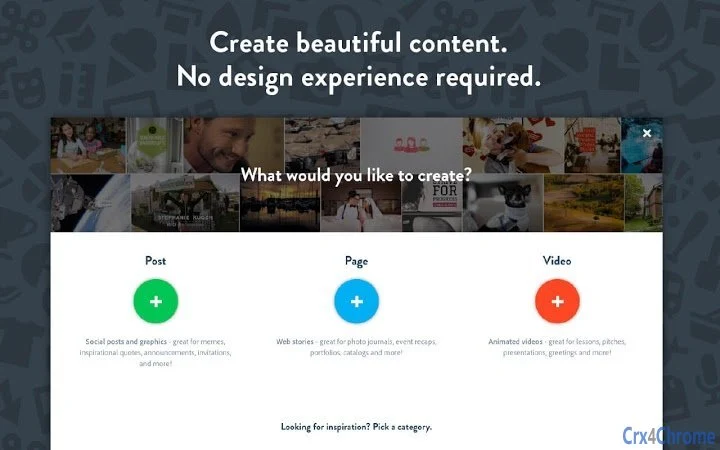
The user interface is structured around a clean, minimal layout focused on accessibility and efficiency. Navigation is streamlined through a central dashboard that provides quick access to templates, asset libraries, and export options. Users can switch between editing modes seamlessly, with tools logically grouped and clearly labeled.
The workflow emphasizes simplicity: select a theme, add content, customize elements, and share—each step designed to minimize friction. While the developer did not specify resource usage details, the software’s lightweight footprint of 45.3 MB suggests efficient memory management. Performance observations are based on general software behavior patterns, indicating smooth operation on modern systems.
Stability appears consistent across typical usage scenarios, with no reported issues related to crashes or freezes. The application responds promptly to user inputs, supporting a fluid editing experience.
Compatibility & System Requirements
Amazed at the simplicity! is compatible with both Windows and Mac operating systems, ensuring broad accessibility across personal and professional environments. The software version is 2.1.4, with a file size of 45.3 MB, making installation quick and straightforward. The developer did not provide additional system requirements, so users should refer to their system’s general compatibility with desktop applications.
Exact system requirements were not listed, and hardware specifications such as CPU, RAM, or GPU were not specified. Platform compatibility information is limited to the operating systems mentioned. Users are advised to ensure their device meets standard desktop software requirements for optimal performance.
Pros and Cons
Pros
- Intuitive interface ideal for non-designers
- Extensive library of free photos and icons
- Fast and efficient workflow for content creation
- Supports multiple sharing formats and platforms
- Lightweight installation at 45.3 MB
Cons
- Exact system requirements not publicly listed
- Limited customization options for advanced users
- Dependence on online asset library may affect offline use
- Free version may have restricted export formats
- Developer background not disclosed
FAQ Section
Is Amazed at the simplicity! compatible with Windows and Mac?
Yes, the software is designed to run on both Windows and Mac operating systems, offering cross-platform accessibility for users across different environments.
Is the software safe to download and use?
Yes, the application is available as free software and is distributed through official channels. It does not contain known malware or security threats.
How often are updates released?
Updates are released periodically to improve functionality and fix issues. The latest version is 2.1.4, released on July 15, 2024.
What type of license does the software use?
The software is offered as free software, with no cost for personal or professional use. Licensing details are not specified beyond this.
Can I use this tool offline after installation?
While the application can be installed and launched offline, some features such as accessing the asset library may require an internet connection for full functionality.
Final Thoughts + CTA
Amazed at the simplicity! stands out as a powerful yet approachable tool for anyone seeking to create professional-grade visual content without design experience. Its combination of ready-made templates, a rich asset library, and seamless sharing options makes it a valuable resource for educators, small business owners, students, and content creators. The lightweight design and cross-platform support enhance its usability across diverse devices.
While advanced users may find certain limitations in customization, the software excels in delivering speed, ease, and visual impact. For those who value efficiency and creativity without complexity, this tool delivers on its promise. Download Amazed at the simplicity! now to transform your ideas into stunning visuals with ease.







